Godot Bridge
Version0.1.1Caution
This addon is at a very early stage of development, so do not expect many functionalities/parameters.
Note
You can create Issues at https://port.numenaute.org/YannK/Godot_bridge if you experience bugs or would like new functionalities.
Godot bridge is a Blender extension we propose to ease workflow between Blender and Godot. We have chosen a different path from Blender studio for their excellent Dogwalk game. The idea is to prepare assets in Blender but no level design, which is developped inside Godot. So the idea behind this tool is to use Blender to create meshes/objects and not whole levels. For this type of workflow with leveldesign prepared in Blender, you would probably prefer Blender Godot Utils.
First grab the addon
You can find all the explanations to install the addon on our Blender page.
Open the panel in 3D View
You will have a new panel in your 3D view.
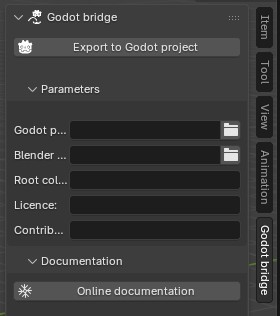
Godot project path
The Godot project path is the root folder in your project path, where assets could be stored for the game.
For instance, if you have your project in your /home/wren/games/cool_project, and you will store your assets in cool_project/3d_imports, you specify /home/wren/games/cool_project/3d_imports.
Blender repository root
The root folder where you will store your Blender files.
For instance, if you have your Blender files usually in /home/wren/3d_assets, and you will store your assets for this project in the subdirectory cool_project_assets, you specify /home/wren/3d_assets/cool_project_assets.
Root collection
In your Blender file, we will check for the collection with this name to organize subdirectories and files in your Godot project.
For instance, if you specify game_finals as root collection, you have to create a collection with this name and put your source assets in sub-collections in this one. The addon will create a new glTF file for each subcollection in this one.
The file structure management
The addon will use those datas to generate yout glTF files in a smiliar hierarchy than your Blender files. Like this, the hierarchy of your glTF files will mirror the iones of your blender files. No more headaches trying to remember the sourcefile of an asset! If you have the path in the Godot project, you can figure out quickly the sourcefile you have used for it.
How does it work ?
Keeping former examples, let’s say Wren creates a Blender file named “bugs.blend” in /home/wren/3d_assets/cool_project_assets/animals. It is amongst other files used for other props.
- …
- 3d_assets
- old_project_assets_1
- old_project_assets_1
- cool_project_assets
- characters
- props
- npc
- animals
- predators.blend
- grazers.blend
- bugs.blend
- 3d_assets
In the bugs.blend file, hey have a collection named “game_finals”, with sub-collections, each of them containing all the elements to combine each final asset. But there can be also other collection for high resolution models, tempaltes etc. As long as they are no in the game_finals collection, the addon will not manage them.
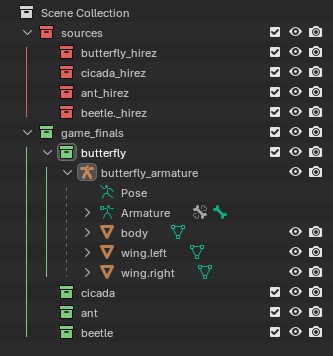
When Wren clicks on the “Export to Godot project”, the addon will check for activated sub-collections (cicada, ant, beetl and butterfly in our example) and will export their content to several glTF files, one for each collection. And the Godot project will mirror the organization of Blender hierarchy. The game project will get those files in a folder named like the Blender file:
- …
- games
- maria_kart
- the_watcher
- cool_project
- 3d_imports
- characters
- props
- npc
- animals
- predators
- grazers
- bugs
- butterfly.gltf
- cicada.gltf
- ant.gltf
- beetle.gltf
- games
From then, you can adapt your Godot workflow as needed, with customized script imports for instance.